
- Home
- IVD
- By Technology Types
- By Diseases Types
- By Product Types
- Research
- Resource
- Distributors
- Company
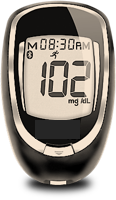
The blood glucose monitoring system is intended for the quantitative measurement of glucose levels in fresh capillary whole blood collected from the fingertip or forearm. This product is intended for use by a single patient only and must not be shared with others. This product is intended for in vitro self-testing by patients with diabetes to assist in monitoring diabetes control. This product is not intended for the diagnosis or screening of diabetes, nor is it intended for use in newborns.
| Control Solution | 1.Gather and check supplies. Do not use test strips or control solution if either Use By Dates (written or printed) have passed. 2.Allow control solution, test strip vial, and meter to adjust to room temperature. 3.Wash hands with soap and water. Dry thoroughly. 4.Gently swirl or invert the control solution bottle to mix. Do not shake. 5.Remove one test strip from the vial. Close the vial immediately. 6.Insert the test strip firmly into the Test Port. The meter turns on automatically. 7.Remove the cap from the control solution bottle. Gently squeeze a drop onto a clean tissue. 8.Wipe the bottle tip and discard the tissue. Gently squeeze a drop onto a small piece of unused aluminum foil, clear plastic wrap, or waxed paper. 9.With the test strip still in the meter, touch the Sample Tip to the top of the drop. Allow the drop to be drawn into the test strip. 10.Remove the test strip from the drop when the display begins to count down from 4. 11.After testing is finished, the result appears in the display with the control symbol. 12.Compare the result to the Control Test Range printed on the test strip vial label for the control solution level you are testing. 13.After the result is shown, hold the meter with the test strip pointing into an appropriate waste container. Press the Strip Release Button to release and discard the test strip. The meter turns off. Recap the control solution bottle. |
| Blood | 1.Check supplies. Do not use test strips if either Use By Dates (written or printed) have passed. 2.Allow the test strip vial and meter to adjust to room temperature. 3.Wash hands (and forearm for alternate site testing) in warm, soapy water. Rinse well and dry thoroughly. Remove one test strip from the vial. Close the test strip vial immediately. 4.Insert the test strip firmly into the Test Port. The meter turns on. 5.Wait until the Drop Symbol appears in the display. 6.Lance the fingertip (or forearm). Allow a blood drop to form. 7.With the test strip in the meter, touch the Sample Tip to the top of the blood drop and allow the blood to be drawn into the test strip. 8.Remove the test strip from the drop when the meter begins to count down from 4. The meter is performing the test. 9.After testing is finished, the result appears in the display. 10.Record the result in a log book. 11.Hold the meter with the test strip pointing into an appropriate waste container. Press the Strip Release Button to discard the test strip. The meter turns off. The result is stored in memory. |
| Test Sample | Control solution and blood |
| Result Range | 20-600 mg/dL |
| Sample Size | 0.4 μL |
| Test Time | 4 seconds |
| Result Value | Plasma equivalent values |
| Assay Method | Electrochemical |
| Power Supply | One 3V lithium battery |
| Battery Life | Approximately 1,000 tests or 3 years |
| Automatic Shut-off | After two minutes of non-use |
| Weight | 1.5 ounces |
| Size | 2.0” x 3.5” x 0.75” |
| Memory Size | 400 results |
|
There is no product in your cart. |
Copyright © 2026 Alta DiagnoTech. All rights reserved.